The maturity of technology and the price decrease have made Solid State Drives (SSDs) replace traditional mechanical hard drives as an essential component in computer builds. Gamers are aware that SSDs offer significantly faster read and write speeds and lower latency than mechanical hard drives. However, what you may not know is that there’s a critical factor, known as write amplification, that affects the lifespan of an SSD.

Before discussing write amplification, it’s important to understand the internal structure of NAND storage. The smallest unit inside NAND is called a page, which is 4K in size. Sixty-four or 128 pages make up a block, and several blocks form a plane. Multiple planes make up a die, and multiple dies make up a flash chip.
Next, it’s crucial to note that the writing mechanism of an SSD is entirely different from that of a mechanical hard drive. NAND flash cannot directly overwrite existing data. If a block needs to be written to and it already contains files, those files must be erased before new data can be written.
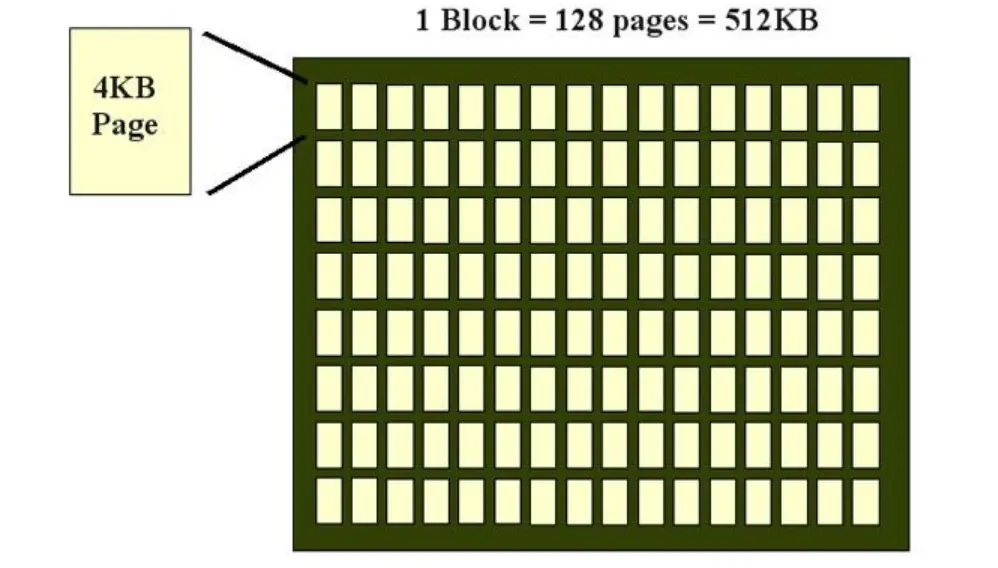
This leads to a problem: the smallest unit an SSD can write is a page, but the smallest unit it can erase is a block. This discrepancy means that when a user wants to update a small amount of data, the SSD needs to erase the entire block of data, then merge the valid data from the old block with the new data, and finally write it all back to a new, empty block.
For example, if you want to modify a 4KB file on an SSD, the controller can’t just update these 4 KB. Instead, it needs to read the entire 512KB block containing the 4KB, erase this 512KB block, and then write back the valid data minus the 4KB change plus the new 4KB data to a new block. Thus, to alter 4KB of data, the SSD effectively erases and writes 512KB of data, resulting in a write amplification of 128 times.
Although this example might seem extreme, write amplification becomes more severe as the remaining capacity of an SSD decreases. To distribute the write load evenly and prevent excessive wear in certain areas, SSDs scatter files across different blocks. The less space available, the more scattered the files that need to be modified or written, exacerbating write amplification.
Write amplification slows down random speeds and increases unnecessary erase and write operations, hastening the overall wear of the SSD. It’s crucial to avoid this as much as possible.
Since the data stored on an SSD is invaluable, it’s essential to minimize the impact of write amplification. Solutions include opting for newer models with optimized algorithms and space allocation, utilizing smart caching technologies to reduce write amplification, and ensuring that SSDs, especially those used as system drives, are not left with too little free space to maintain optimal performance.

Disclaimer: This article is created by the original author. The content of the article represents their personal opinions. Our reposting is for sharing and discussion purposes only and does not imply our endorsement or agreement. If you have any objections, please contact us through the provided channels.